
Plan, prepare, maintain
By Nicolas Lemielle, Director of DigiWall ·
Wallify 1.13 takes the ERP into the workshop and out into the field: a configurable planning board for your production and service work, management of your equipment and its maintenance plans, picking for customer orders, and a sellable stock screen you can open up to your customers.
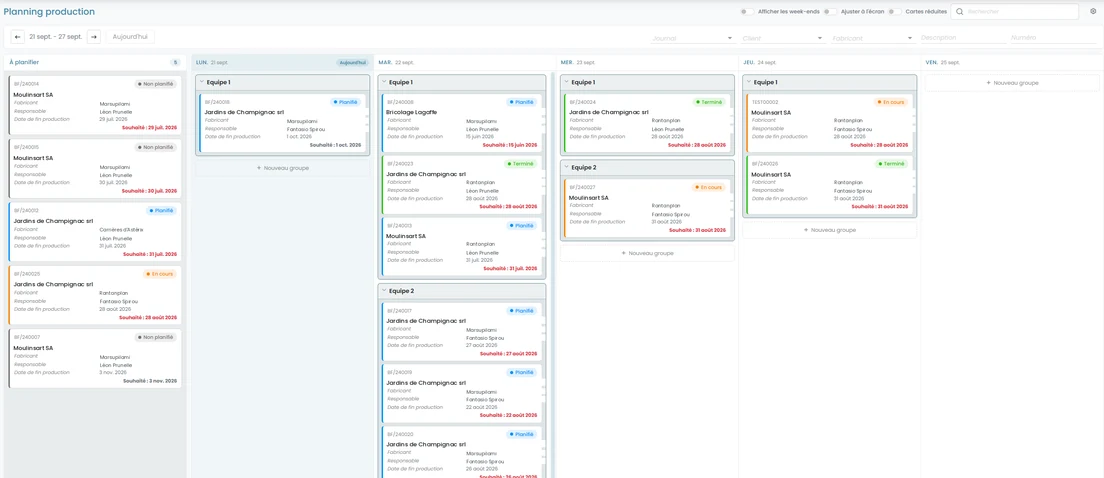
A planning board you configure the way you work
Wallify 1.13 introduces a generic planning engine. From the configuration screen you create as many boards as you need (per workshop, per site, per team), and for each one you set the granularity (day, week or month), the zoom levels, the data sources and the filters offered to your users.
A board can combine several sources: production orders, service orders, production steps, service steps. Anything not yet scheduled sits in a “To schedule” column, and assigning it to a date, a group or a resource is a simple drag and drop. The status changes straight from the card, past periods are hatched and an overdue target date turns red: at a glance, you see what is running late.
In version 1.14, that same engine will also be configurable for your deliveries and goods receipts.
Your equipment and its maintenance plans
In Wallify, a piece of equipment is a physical company asset (a machine, a tool, a measuring instrument), located, maintained and tracked individually through its serial number, while using an existing item as its technical reference.
Every piece of equipment can carry its document attachments, a responsible worker and one or more maintenance plans, defined by service type and by frequency. The service calls generated then land on the planning board described above: the cycle is complete, from scheduled preventive maintenance to the service report.
Picking for customer orders
Picking lists, available on the purchasing side since version 1.12, now extend to the sales side. From a customer order, you generate one or more picking lists by selecting the quantities to pick, on the current order and, if you wish, on the customer’s other open orders. From one or more delivery or collection notes, a picking list automatically takes over every line to be picked.
Your warehouse staff work from a clear list, and the Logistics menu gives access to every picking list in progress.
Show your available stock, and sell it
The new “Sellable stock” screen gives a filtered overview of the items genuinely available for sale, with their photos. The point: being able to show your stock to someone outside the company, so they can see what you have and what you are willing to sell them (offcuts of slab, for instance).
The criteria that decide what counts as “sellable” are configurable, access depends on the permissions of the signed-in user’s role, and an order can be created straight from the screen once the quantity is confirmed.
Checking stock without counting everything
The on-demand stock check lets you verify stock in a targeted way, without running a full inventory: check one location, investigate a suspected discrepancy, confirm after a stock movement or prepare for an audit. A check carries an owner, a selection of locations and a list of items with, for each one, the theoretical quantity and the quantity actually counted. It can be prepared by a logistics manager, then assigned to an operator who does the counting in the field before validation.
Also in this release
A single, configurable Excel export: it replaces the three previous exports, runs asynchronously and notifies you as soon as the file is ready. Scope, language and reference data are set before you launch it.
Reorganised menus: new Operations, Planning and Logistics groups; prospects and activities move to the Parties menu.
Import and export of pricing rules for sales and purchasing, as already exists for customers and items.
The production order straight from a customer order, reachable from the lines concerned and visible in the job’s flow.
A first set of secured APIs letting an external application read jobs and their linked delivery notes, through token-protected access.
A quick search with two modes: it replaces the active filters, or refines them without clearing them (your choice).
In practice
Picking lists belong to the Logistics module, production orders to the Production module and service orders to the Service module. Several of these features need to be switched on and configured by us: talk to us, and we will work out together what makes sense for your organisation.