
The day your stock tells you what to order
By Nicolas Lemielle, Director of DigiWall ·
Everyone knows the scene: the order is signed, production can start, and three pallets are missing. Nobody is at fault — the information was scattered between physical stock, pending customer orders and purchase orders already placed. Wallify brings those three truths onto a single line, and works out the quantity to order.
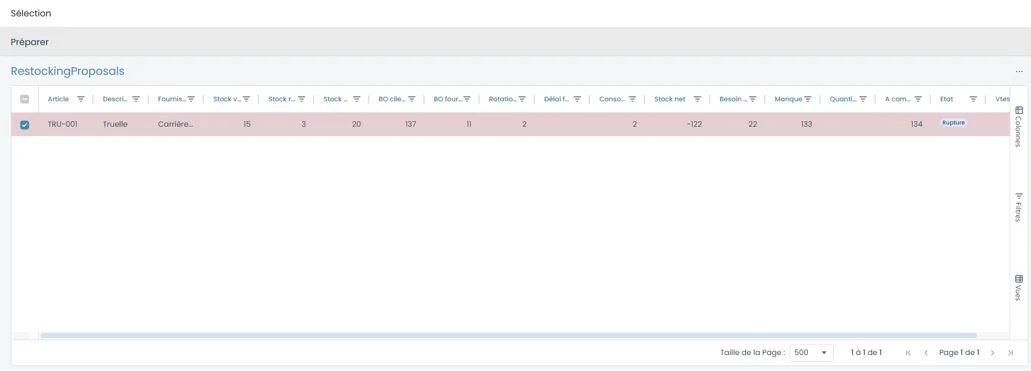
One line, and the decision is made
The replenishment screen starts from your items and shows, side by side, what is in stock, what is already reserved by customer orders, what is still due in from your suppliers, the item’s turnover and your supplier’s lead time.
From those elements Wallify derives three figures that can be read at a glance: net stock — what really remains available once commitments are deducted, and it is often negative —, the shortfall, and the quantity to order. An item under strain is flagged as such: the « Shortage » state appears without you having to compare columns.
Starting from the items, not from a separate screen
Replenishment is not an isolated module you have to go to. It starts from the item list, on a selection: you filter by family, by sub-family, by supplier or by material, you select, you ask for replenishment. The proposal covers only what you chose to look at.
You keep control of the quantity proposed. Wallify calculates, you decide — a lead time about to stretch, a customer order about to land, that is not in a database.
What every order line already tells you
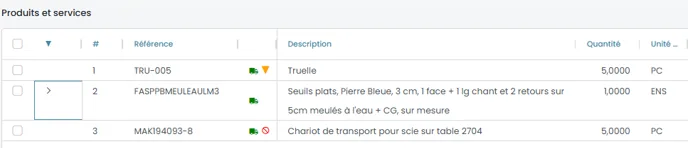
Replenishment is only the upstream part. In a customer order, each line carries its own situation, flagged with a pictogram: a reserved quantity, a quantity awaited from the supplier, a delivered quantity, a cancelled quantity. Several can coexist on the same line, when a delivery was partial.
In practice, a salesperson on the phone with a customer knows where every line of the order stands without calling the warehouse. It is little on screen, and a good many fewer phone calls.

A question on this subject? Our analysts will answer you directly.