
Your accountant stops retyping anything
By Nicolas Lemielle, Director of DigiWall ·
In many small firms, accounting starts with retyping. Invoices go out as PDFs, someone picks them up one by one, and the discrepancies surface at the annual accounts. Wallify and Horus exchange directly: what is invoiced in one arrives in the other, with its allocations.
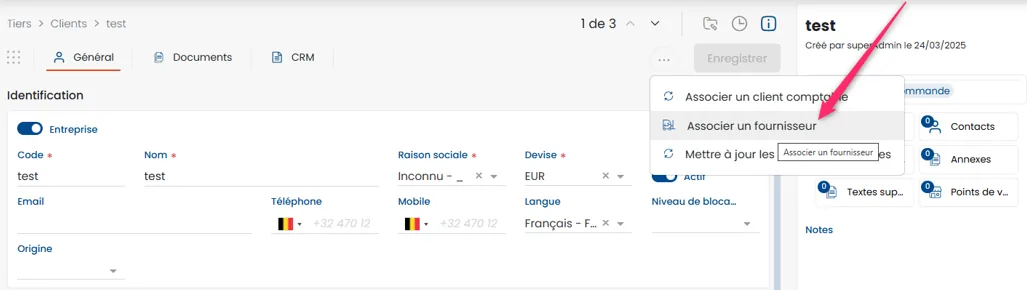
The same party, on both sides
The classic case: a company that buys from you and from which you buy. Two records, two accounts, and a balance that neither of them gets right. From a customer record, the « Link a supplier » action ties the two roles together, and the reconciliation happens at the next synchronisation. The reverse exists too, to untie what was linked by mistake.
Payments recorded in accounting come back daily onto the sales documents. So the balance your salesperson sees is the accounting balance, not a local estimate — and the payment delay shown next to it is not last week’s news.
Exporting what is needed, when it is needed
You choose what goes out: all customers or only the new ones, a range of invoice dates, a single customer from their record when it is urgent. The export does not stop at amounts — it carries the allocation accounts, purchase as well as sale, which Wallify distinguishes at item level.
When it jams, you know why
This is the part rarely discussed, and often the one that costs time. The exchange now goes through a programmatic interface, and Wallify turns its errors into usable messages: data refused, authorisation expired and due for renewal, insufficient rights for the user, resource not found, incident on the server side.
The difference is simple. A « synchronisation failed » forces you to call someone. A message that says which of the five problems occurred lets you fix it yourself most of the time.
A question on this subject? Our analysts will answer you directly.